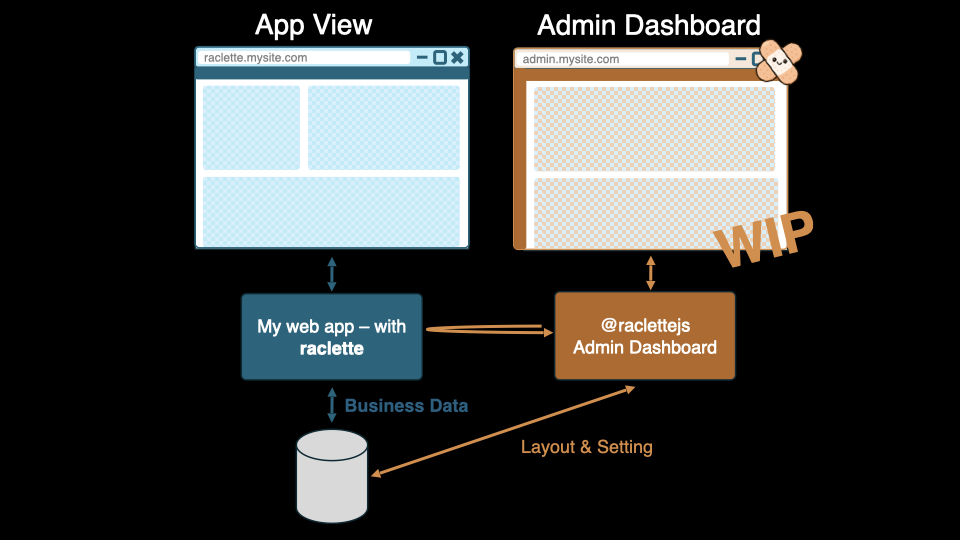
Architecture Overview
racletteJS is built as a managed runtime for platform and portal applications. The framework provides a full backend, frontend runtime, and CLI bootstrap layer so teams can focus on business features instead of infrastructure setup.
racletteJS Core
The racletteJS Core is the foundation of every racletteJS app and includes three runtime parts:
- A backend part written on Fastify, including auth/session handling and core runtime services
- A frontend part including the client runtime and Redux store integration
- A CLI part that bootstraps VFS generation, package setup, Docker configuration, and startup flow
Core currently uses a MongoDB-based data layer, and this is planned to become more flexible over time.
Orchestrator
The Orchestrator connects core frontend runtime behavior to UI framework rendering.
In the current state, orchestrator support is intentionally limited and still WIP:
- Vue and React are the intended orchestrator targets
- The active implementation is currently fixed to Vue
This is important context so developers do not assume a fully framework-agnostic runtime today.
racletteJS Workbench
The racletteJS Workbench is optional and delivered as a separate npm package. It is automatically included when using create-raclette-app and is highly recommended for normal usage.
Without Workbench, system data management must be done manually via API/database workflows.
With Workbench, teams can configure:
- Compositions
- Interaction Links
- Users and permissions
- Tags and metadata
Widgets
Widgets are the smallest composable units in raclette. Each widget combines:
- A visual UI component
- Its business logic and state configuration
Widgets can range from simple buttons to complex data tables or input forms. They are fully reusable and self-contained, making it easy to manage even large, complex views.
Compositions
A Composition defines the structure and content of a view. It describes:
- Which widgets are displayed
- How they are laid out on the screen
- Any logical relationships between them
Compositions are fully declarative. They act as blueprints for screens, making views easy to define, configure, and modify — without hardcoding layout logic.
InteractionLinks
InteractionLinks define how and when Compositions are triggered. They capture user interactions and describe:
- The context of the interaction (e.g., current user, current view)
- What Composition should be shown
- Which parameters should be passed
- How the transition is handled (modal, navigation, etc.)
InteractionLinks abstract away manual wiring of events. Instead, you declare what should happen, and raclette takes care of the rest.
Global Store (Client Only)
At the center of frontend behavior is racletteJS' global Redux store. This store is a frontend/client-only state layer and provides:
- Visibility into active Widgets and Compositions
- Access to global configuration, metadata, and context
- Consistent and predictable state management
Frontend runtime parts — including orchestrator flows and widgets — read from and write to this store.
This allows for powerful features like:
- State-driven navigation
- Dynamic rendering
- Reactive data flows
Docker-First Development Runtime
racletteJS development is strongly Docker-oriented to keep environments consistent and close to final runtime behavior.
For details on container topology, startup flow, and hot-reload behavior, see Runtime and containers.
Summary
racletteJS separates framework runtime concerns from application business logic. In practice, most application code should live in plugins, while the core runtime and Docker startup flow are managed by racletteJS itself.